Admin settings
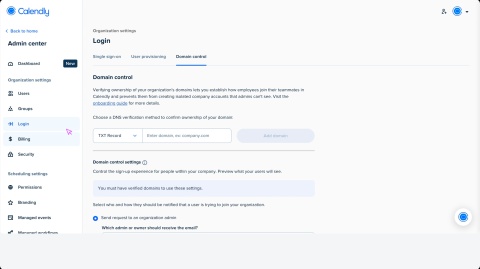

Admin settings let you manage users, groups, workspace configuration, and security across your organization. You can access Admin settings from the Settings modal in your Calendly account.
Access is available to owners, admins, and group admins (with limited access). Everyone else will only see the organization directory.
How to access Admin settings
- Go to Settings.
- Locate the Admin section in the left sidebar.
- From here, you can navigate between the sections below.
Admin settings sections
Workspace
- Workspace name — Set your organization's name.
- Dashboard — Review activity overview and pending invites.
- People — Add or remove users, assign roles, and resend invitations. Manage groups and assign group admins.
- Branding — Customize your org's name and scheduling page logo.
Dashboard
See an overview of your organization's activity, including:
- Pending invites
- Users missing integrations
- Meetings scheduled last week
People
Manage all users, groups, and permissions within your workspace.
- Active users — View and manage all active workspace members. Add new users, assign roles (owner, admin, user), remove users, and resend invitations.
- Pending users — Review users with pending invitations and resend or cancel invitations as needed.
- Groups — Organize users into groups, assign group admins, and manage group membership for easier permission delegation.
- Event type permissions — Control which users or groups can manage shared event types.
- Automations permissions — Control which users or groups can manage shared automations.
- Invitation permissions — Manage who can send invitations to new users to join your workspace.
Access
Manage how users log in to your Calendly workspace:
- Domain control — (Enterprise only) Manage domain-based access.
- Single sign-on — Set up SSO for your organization.
- User provisioning — Use SCIM to automate user provisioning.
- Activity log — (Enterprise only) Review all user and admin actions within your workspace.
Security
- Data & Privacy — Review data deletion settings and compliance options.
Billing
Billing settings — Manage invoices, payment methods, and your subscription plan.
Managed events
Set up standardized event type templates and assign them to users or groups across your workspace. Control template settings, and changes apply to all assigned users.
For more details, see Managed event types overview.